
This post may contain affiliate links. We may receive a small commission, at no cost to you, if you make a purchase.
Read Disclosure
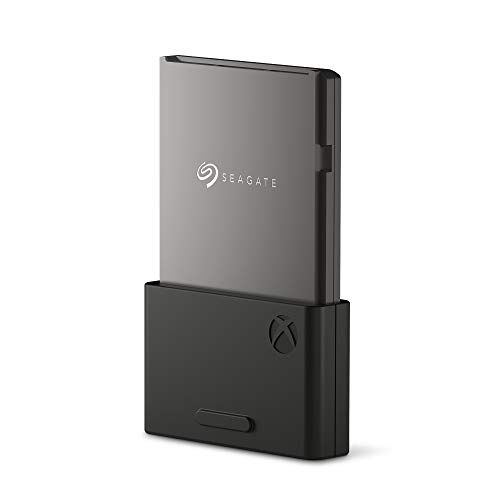
Why Upgrading to a 2TB SSD for Xbox Series X|S is a Game-Changer
Gaming has evolved tremendously over the years, and so has the need for adequate storage. If you’re tired of managing limited storage space and long load times, upgrading to a 2TB Solid State Drive (SSD) for your Xbox Series X|S can revolutionize your gaming experience. This guide will walk you through the benefits, setup, costs, and everything you need to know about making this upgrade.
The Case for a 2TB SSD
As games become larger and more graphically intensive, the need for more storage space has become a necessity. Here’s a detailed breakdown of why a 2TB SSD is a worthy investment:
Cost and Value Comparison
When considering an upgrade, cost is a significant factor. Here’s a comparison of current prices:
- 1TB SSD: $149
- 2TB SSD: $249
- 4TB SSD: $881
While a 4TB drive offers more space for the money, it’s essential to consider that not all drives are optimized for Xbox Series X|S. Dedicated Xbox-compatible SSDs ensure that you get the best performance without the hassle of compatibility issues.
Performance Benefits
A 2TB SSD specifically designed for Xbox Series X|S provides several advantages over generic drives:
- Faster Load Times: Spend less time waiting and more time playing.
- Smoother Gameplay: Reduced lag and faster data retrieval enhance your gaming experience.
- Increased Reliability: Xbox-certified SSDs are tested for performance and longevity, ensuring your games run smoothly.
Ease of Installation
The process of upgrading your Xbox Series X|S storage with a 2TB SSD is straightforward:
- Plug it in: Connect the SSD to your Xbox via the USB port.
- Format the Drive: Follow the on-screen instructions to format the drive for Xbox use.
- Transfer Your Games: Move your existing games and apps to the new SSD.
For more tips on setting up and using your Xbox Series X|S, check out these helpful guides:
- Xbox Series S Unboxing: The Most Practical and Compact Microsoft Console
- How to Mount Your Xbox Series S on the Wall
- Wall-Mounted Xbox Series X
This plug-and-play setup makes it accessible even for those who aren’t tech-savvy.
Managing Your Game Library
One of the most significant benefits of a 2TB SSD is the ability to manage your game library more efficiently. Here’s how it can help:
- More Storage: Keep more games installed and ready to play.
- Organized Space: Separate your most played games from those you play occasionally.
- Quick Access: Reduce the need for constant data shuffling, saving you time and effort.
Comparing Storage Solutions
Generic External Drives
While generic external drives may seem like a cost-effective solution, they come with several drawbacks:
- Compatibility Issues: Xbox updates can sometimes render these drives incompatible.
- Performance Lag: They often lack the optimized performance of Xbox-certified SSDs.
- Inconvenient Game Management: Moving games between external and internal storage can be a hassle.
M.2 SSDs and Standard HDDs
Other options include M.2 SSDs and standard Hard Disk Drives (HDDs):
- M.2 SSDs: While potentially cheaper, their compatibility with Xbox Series X|S can be hit or miss. You might save money initially but risk future incompatibility.
- Standard HDDs: These offer higher capacity at a lower cost but are significantly slower, affecting load times and overall performance.
Future-Proofing Your Gaming Setup
Investing in a 2TB SSD now is a proactive way to future-proof your gaming setup. As game sizes continue to grow, having ample storage will save you from the hassle of constant data management and ensure you’re always ready for new releases.
Cost-Saving Tips and Alternatives
If a dedicated 2TB SSD seems too pricey, consider these alternatives:
- Hybrid Drives: These combine SSD and HDD technology, offering a balance between speed and capacity.
- Sales and Discounts: Keep an eye out for sales and discounts, particularly during major shopping events like Black Friday.
Detailed Setup Guide
Setting up your new 2TB SSD is simple:
- Connect the Drive: Plug the SSD into one of the USB ports on your Xbox.
- Format for Xbox: Follow the on-screen prompts to format the drive.
- Data Transfer: Use the Xbox’s storage settings to transfer your games to the new SSD.
- Customize Storage: Decide whether to store games on the SSD and apps on the internal drive for optimal performance.
Practical Usage Tips
To make the most of your new storage setup, consider these tips:
- Automatic Updates: Ensure your Xbox is set to automatically update games, saving you from manual checks.
- Data Management: Regularly check your storage space and manage your game library to avoid clutter.
- Backup Solutions: Keep a backup of your important game data to avoid losing progress in case of drive failure.
Pros and Cons of Upgrading to a 2TB SSD
Pros:
- Increased Storage: More space for games, apps, and media.
- Faster Load Times: Significantly reduced waiting times, enhancing your gaming experience.
- Smooth Gameplay: Optimized performance ensures minimal lag and faster data retrieval.
- Easy Installation: Plug-and-play setup with straightforward formatting and data transfer.
- Future-Proofing: Adequate storage for upcoming game releases and updates.
Cons:
- Higher Cost: 2TB SSDs are more expensive compared to traditional HDDs and smaller SSDs.
- Compatibility: Potential issues with non-Xbox-certified drives.
- Data Management: Regular monitoring and management of storage space may still be necessary.
- Transfer Time: Initial data transfer to the new drive can be time-consuming.
Conclusion
Upgrading to a 2TB SSD for your Xbox Series X|S is more than just a storage boost—it’s an enhancement to your entire gaming experience. With faster load times, smoother gameplay, and ample space for all your favorite games, it’s a worthwhile investment for any serious gamer.


AFFILIATED LINKS/ADVERTISING NOTICE All links are Affiliated where possible. When you click on links to various merchants posted here and make a purchase, this can result in me earning a commission from qualifying purchases.”; I am a participant in the Amazon Services LLC Associates Program, an affiliate advertising program designed to provide a means for sites to earn advertising fees by advertising and linking to AMAZON Sites (including, but not limited to Amazon US/UK/DE/ES/FR/NL/IT/CAN) Last update on 2025-09-08