
This post may contain affiliate links. We may receive a small commission, at no cost to you, if you make a purchase.
Read Disclosure
Are you looking to control temperature and humidity in your home or any specific area like your fridge or cigar box? Using a smart sensor with ZigBee 3.0 might be the solution you’re searching for. In this guide, I’ll explain how this little device works, what you need to get started, and the benefits it offers compared to traditional Wi-Fi-based devices.
Introduction to ZigBee 3.0 Smart Sensors
Hi everyone, I’m Dario from MediaBoxEnt, and today I’ll be showcasing a ZigBee 3.0 smart sensor for temperature and humidity control. This device is a must-have if you want real-time updates and efficient control over your environment.
Why Choose ZigBee 3.0 Over Wi-Fi?
ZigBee 3.0 and Wi-Fi devices have different operational methods and advantages. Here’s a breakdown of why ZigBee might be the better choice:
- Less Interference: ZigBee operates on a different frequency than Wi-Fi (2.4 GHz), reducing interference from other devices.
- Lower Power Consumption: ZigBee devices use significantly less power, making them more energy-efficient.
- Mesh Network: Unlike Wi-Fi, ZigBee creates a mesh network where each device communicates with the next, extending the range and reliability of your smart home network.
Getting Started with ZigBee 3.0
To use a ZigBee 3.0 sensor, you’ll need:
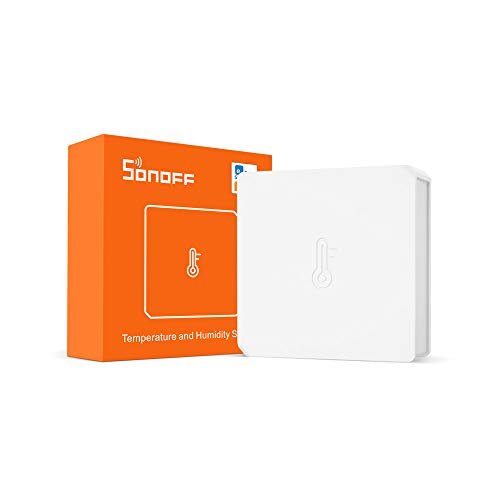
- ZigBee 3.0 Sensor: The main device that measures temperature and humidity.
- ZigBee Gateway: A hub that connects the ZigBee sensor to your home network and allows you to control it remotely.
- Battery: Most ZigBee sensors are battery-operated, providing flexibility in placement.
Setting Up Your ZigBee 3.0 Sensor
Step 1: Install the Battery
Insert the battery into your ZigBee sensor. This will power up the device and allow it to start measuring the environment.
Step 2: Connect the Gateway
Connect the ZigBee gateway to your home network. Follow the manufacturer’s instructions for pairing the gateway with your sensor. Typically, this involves pressing a button on the sensor and waiting for it to connect.
Step 3: Pair the Sensor
Using the companion app (such as Smart Life or Tuya), add the sensor to your network. The app will guide you through the process, which usually involves selecting the device type and waiting for it to sync.
Step 4: Configure Settings
Once connected, you can name your device (e.g., “Living Room Sensor”) and set up notifications for specific temperature or humidity thresholds.
Advantages of ZigBee 3.0 Sensors
Real-Time Monitoring
With ZigBee 3.0, you get real-time updates on temperature and humidity levels. This is crucial for environments where precise control is necessary, such as cigar boxes, wine cellars, or server rooms.
Historical Data
Many ZigBee sensors allow you to track historical data, helping you understand trends and make informed decisions about your environment.
Compatibility
ZigBee 3.0 devices are compatible with major smart home ecosystems, including Alexa and Google Home, enabling voice control and automation.
Energy Efficiency
Due to their low power consumption, ZigBee sensors can last a long time on a single battery, reducing the need for frequent replacements.
Practical Applications
- Home Temperature Control: Maintain comfortable living conditions by monitoring and adjusting your home’s temperature.
- Fridge Monitoring: Ensure your food stays fresh by keeping an eye on the fridge’s temperature and humidity.
- Cigar Humidors: Preserve your cigars by maintaining the optimal humidity level.
- Server Rooms: Protect your IT equipment by monitoring environmental conditions.
Troubleshooting Common Issues
Connectivity Problems
If your sensor is not connecting to the gateway, ensure it’s within range and that the battery is properly installed. Sometimes resetting the sensor and gateway can resolve connectivity issues.
Inaccurate Readings
For inaccurate temperature or humidity readings, check if the sensor is placed correctly. Avoid placing it near heat sources or in direct sunlight, as this can skew the data.
Future Enhancements
Stay tuned for more videos and updates on ZigBee and other smart home technologies. We’ll be exploring advanced features, new devices, and integration tips to help you make the most of your smart home setup.
ZigBee 3.0 vs. Wi-Fi for Smart Home Devices
When it comes to smart home automation, choosing between ZigBee 3.0 and Wi-Fi can significantly impact the efficiency, cost, and usability of your network. Both have their advantages and drawbacks. Let’s explore these technologies and see which might be the better choice for your smart home setup.
Key Differences Between ZigBee 3.0 and Wi-Fi
Power Consumption
One of the most significant differences between ZigBee 3.0 and Wi-Fi is power consumption.
- ZigBee 3.0: ZigBee devices are designed to use very little power, which is ideal for battery-operated devices. For example, a typical ZigBee smart switch might use less than a quarter of a watt.
- Wi-Fi: Wi-Fi devices tend to consume more power. A Wi-Fi smart switch, for instance, might use around 1 to 1.5 watts. This higher power consumption can lead to more frequent battery replacements for battery-operated devices.
Network Interference
- ZigBee 3.0: Operates on a different frequency than Wi-Fi (usually 2.4 GHz but with different channels), which can reduce interference from other devices. This is especially beneficial in environments with many wireless devices.
- Wi-Fi: Operates primarily on 2.4 GHz and 5 GHz bands. In crowded environments, Wi-Fi networks can experience interference from other Wi-Fi networks, microwaves, and other electronic devices, potentially affecting performance.
Range and Coverage
- ZigBee 3.0: Uses a mesh network where each device can relay information to the next. This means that the network’s range can be extended by adding more ZigBee devices, making it ideal for larger homes.
- Wi-Fi: Typically depends on the range of the router. While Wi-Fi extenders and mesh systems can enhance coverage, they generally do not achieve the same seamless range extension as ZigBee’s native mesh networking capabilities.
Data Transfer Speed
- ZigBee 3.0: Has lower data transfer rates compared to Wi-Fi. This is sufficient for most smart home applications (like turning on lights or monitoring temperature), but not suitable for high-bandwidth tasks like video streaming.
- Wi-Fi: Offers high data transfer rates, making it ideal for bandwidth-intensive activities like streaming video, online gaming, and large file downloads.
Examples of Power Consumption
ZigBee 3.0 Devices
- Smart Switch: Uses less than 0.25 watts.
- Temperature Sensor: Typically uses around 0.05 watts.
Wi-Fi Devices
- Smart Switch: Uses around 1 to 1.5 watts.
- Temperature Sensor: Uses about 0.5 watts.
Yearly Power Consumption Cost Comparison
Let’s assume the cost of electricity is $0.12 per kWh. Here’s a simple comparison for 10 devices running 24/7:
- ZigBee Smart Switch: 0.25 watts * 10 devices = 2.5 watts
- Annual consumption: 2.5 watts * 24 hours/day * 365 days/year = 21.9 kWh
- Annual cost: 21.9 kWh * $0.12 = $2.63
- Wi-Fi Smart Switch: 1.5 watts * 10 devices = 15 watts
- Annual consumption: 15 watts * 24 hours/day * 365 days/year = 131.4 kWh
- Annual cost: 131.4 kWh * $0.12 = $15.77
As illustrated, ZigBee devices can be significantly cheaper to operate annually compared to their Wi-Fi counterparts due to their lower power consumption.
Conclusion
Choosing between ZigBee 3.0 and Wi-Fi for your smart home devices depends on your specific needs:
- Choose ZigBee 3.0 if you need low power consumption, extended range via mesh networking, and reduced interference.
- Choose Wi-Fi if you require higher data transfer rates and do not mind the higher power consumption, particularly for devices that need to handle more data.
Both technologies offer robust solutions for different aspects of smart home automation, and in many cases, a combination of both might provide the most comprehensive coverage and functionality.
Recommended Reading
- How to Make Your Shades Super Smart at Home
- Comprehensive Guide: Setting Up the Mini Spy Camera WiFi Wireless 1080P HD
- Simplifica tu vida con el Sofabaton X1, el control remoto universal definitivo



AFFILIATED LINKS/ADVERTISING NOTICE All links are Affiliated where possible. When you click on links to various merchants posted here and make a purchase, this can result in me earning a commission from qualifying purchases.”; I am a participant in the Amazon Services LLC Associates Program, an affiliate advertising program designed to provide a means for sites to earn advertising fees by advertising and linking to AMAZON Sites (including, but not limited to Amazon US/UK/DE/ES/FR/NL/IT/CAN) Last update on 2025-10-03
Não tenho certeza de onde você está conseguindo suas informações, mas é um bom tópico. Preciso passar algum tempo aprendendo muito mais ou entendendo mais. Obrigado pelas informações magníficas. Eu estava procurando essas informações para minha missão
obviously like your website but you need to test the spelling on quite a few of your posts Several of them are rife with spelling problems and I to find it very troublesome to inform the reality on the other hand Ill certainly come back again
I found this post to be very informative and well-organized. Your detailed analysis and clear explanations make it a pleasure to read. The practical examples you included were particularly helpful. Thank you for sharing your knowledge with us.
What an excellent piece of writing! The data was really helpful and applicable to my situation. You have an interesting way with words that simplifies difficult ideas. Your thorough explanations and the effort you put into putting this together are greatly appreciated. Anyone curious about this topic will benefit much from reading it.
What an outstanding work! Anyone interested in the topic will find it a must-read due to your interesting writing style and excellent research. Your inclusion of examples and practical ideas is really appreciated. I appreciate you taking the time to share your wise words.
Somebody essentially lend a hand to make significantly articles Id state That is the very first time I frequented your website page and up to now I surprised with the research you made to make this actual submit amazing Wonderful task