
This post may contain affiliate links. We may receive a small commission, at no cost to you, if you make a purchase.
Read Disclosure
Introduction
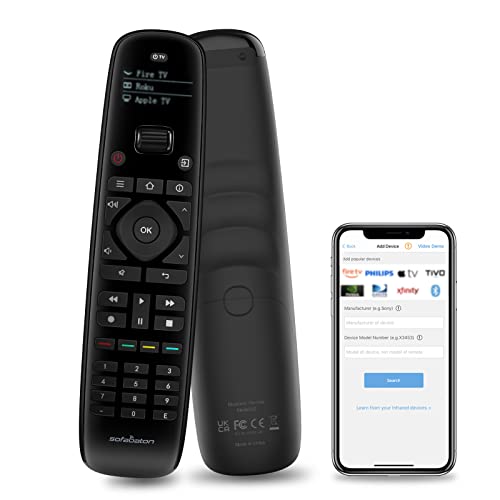
Modern homes are filled with various entertainment devices, each requiring its own remote control. This clutter can make managing your home entertainment a hassle. Enter the SofaBaton X1S Universal Remote with Hub, a device designed to streamline your home entertainment system by consolidating all your remotes into one intuitive device. In this guide, we’ll explore how this universal remote can simplify your life by managing your devices seamlessly through a single hub and app.
For content creators looking to upgrade their recording setup, check out our guide on the 4K Dual Camera Camcorder, perfect for aspiring YouTubers.
Why Choose the SofaBaton X1S?
The SofaBaton X1S isn’t just another universal remote. It’s a comprehensive solution for controlling multiple devices including TVs, sound systems, gaming consoles, and more. Here’s why it stands out:
- All-in-One Control: Compatible with IR, RF, and Bluetooth devices.
- Smart App Integration: Use your smartphone to manage devices via the SofaBaton app.
- Easy Setup: Simple to install and configure, reducing setup time.
Additionally, if you’re in the market for high-quality recording equipment, don’t miss our review of the 4K Digital Camera, an excellent choice for YouTube creators.
Unboxing the SofaBaton X1S
When you open the box, you’ll find:
- SofaBaton X1S Remote
- Wi-Fi Hub
- Two USB-C Cables (for charging and hub connection)
- Power Adapter
- RF Transmitters (three units)
- Quick Start Guide
Each component plays a crucial role in ensuring that your remote works flawlessly with all your devices. Let’s break down the setup process and usage tips.
Setting Up Your SofaBaton X1S
Step 1: Download the App
- Install the App: Download the SofaBaton app from the Apple App Store or Google Play Store.
- Create an Account: Open the app and create an account to sync your devices.
Step 2: Connect the Hub
- Power the Hub: Connect the hub to a power source using the provided adapter.
- Wi-Fi Setup: Follow the app instructions to connect the hub to your Wi-Fi network.
- Position the Hub: Place the hub centrally among your devices for optimal performance.
Step 3: Add Devices
- Device Addition: Use the app to add devices. The SofaBaton X1S supports thousands of pre-programmed devices.
- Learn New Commands: If a device isn’t listed, you can teach the remote its commands via the app.
Step 4: Configure Activities
- Create Activities: Set up activities in the app. For example, create a “Watch Movie” activity that turns on your TV, switches the input, and starts your sound system.
- Customize Buttons: Assign specific functions to remote buttons through the app.
Using the SofaBaton X1S
Controlling Devices
- Individual Control: Select and control each device individually from the remote or app.
- Activity Mode: Execute predefined activities to control multiple devices with a single command.
Finding Your Remote
The SofaBaton X1S app has a “Find My Remote” feature. If your remote goes missing, simply use the app to locate it. The remote will emit a sound, making it easy to find.
Advanced Features
Custom Commands
For devices not covered in the pre-programmed list, use the app to learn and store custom IR commands.
Multi-Room Control
The RF transmitters allow control of devices hidden in cabinets or even in different rooms. Set up the transmitters to extend the remote’s reach.
Voice Control Compatibility
The SofaBaton X1S can be integrated with Alexa or Google Assistant for voice commands, making it even easier to control your devices.
Pros and Cons
Pros
- Universal Compatibility: Works with a wide range of devices.
- Ease of Use: Intuitive app and simple setup.
- Customization: Highly customizable buttons and activities.
- Locating Feature: Easily find misplaced remote.
Cons
- Learning Curve: Initial setup of activities may require some time.
- Dependence on Wi-Fi: Hub requires a stable Wi-Fi connection for optimal performance.
Q&A: Common Questions About the SofaBaton X1S
Q1: What devices are compatible with the SofaBaton X1S?
A: The SofaBaton X1S supports a wide range of devices including TVs, sound systems, gaming consoles, streaming devices, and even smart home gadgets. It works with IR, RF, and Bluetooth technology, making it versatile for almost any device in your home.
Q2: How do I update the remote with new devices?
A: Simply open the SofaBaton app, go to the device management section, and add your new device. You can either choose from the list of pre-programmed devices or teach the remote new commands if the device isn’t listed.
Q3: Can I control devices in other rooms with the SofaBaton X1S?
A: Yes, with the included RF transmitters, you can control devices that are hidden or in different rooms. Place the transmitters near your devices to extend the remote’s reach.
Q4: How long does the battery last on the SofaBaton X1S?
A: The remote’s battery can last up to 45 days on a single charge, depending on usage. It charges via USB-C, which is quick and convenient.
Q5: What happens if I lose the remote?
A: The SofaBaton app has a “Find My Remote” feature that will make the remote emit a sound, helping you locate it quickly.
Q6: Is the SofaBaton X1S compatible with voice assistants?
A: Yes, the SofaBaton X1S can be integrated with Alexa or Google Assistant, allowing you to use voice commands to control your devices.
Q7: Can I customize the button layout on the remote?
A: Yes, through the SofaBaton app, you can customize the functions of the buttons to suit your preferences, including setting up custom activities and shortcuts.
Q8: How does the activity feature work?
A: Activities allow you to control multiple devices with a single button. For example, you can create an activity that turns on your TV, sets the input to your streaming device, and adjusts the volume on your sound system, all with one press.
Q9: Does the SofaBaton X1S require a direct line of sight to work?
A: For IR devices, a direct line of sight is needed. However, RF and Bluetooth devices do not require direct line of sight, allowing more flexibility in placement.
Q10: Can I use the remote to control devices without Wi-Fi?
A: Yes, the remote can control IR and RF devices directly without relying on Wi-Fi. However, using the app and certain advanced features does require a Wi-Fi connection.
Conclusion
The SofaBaton X1S Universal Remote with Hub transforms the way you interact with your home entertainment devices. It’s a versatile and powerful tool that brings all your controls into one convenient remote and app, making your life simpler and more connected. Say goodbye to remote control clutter and hello to seamless, smart home control.
For more tips on enhancing your home entertainment system, check out our guide on the 4K Dual Camera Camcorder and our review of the 4K Digital Camera, perfect for YouTube creators.



AFFILIATED LINKS/ADVERTISING NOTICE All links are Affiliated where possible. When you click on links to various merchants posted here and make a purchase, this can result in me earning a commission from qualifying purchases.”; I am a participant in the Amazon Services LLC Associates Program, an affiliate advertising program designed to provide a means for sites to earn advertising fees by advertising and linking to AMAZON Sites (including, but not limited to Amazon US/UK/DE/ES/FR/NL/IT/CAN) Last update on 2026-03-10