
This post may contain affiliate links. We may receive a small commission, at no cost to you, if you make a purchase.
Read Disclosure
Imagine connecting your computer, gaming console, or any HDMI-enabled device to a TV or projector without the hassle of cables. This technology, once seen as complex or costly, is now affordable and easy to use. In this comprehensive guide, we’ll explore how to wirelessly transmit HDMI signals, the devices that make it possible, their benefits and limitations, and how to set them up step by step.
What Is a Wireless HDMI Transmission System?
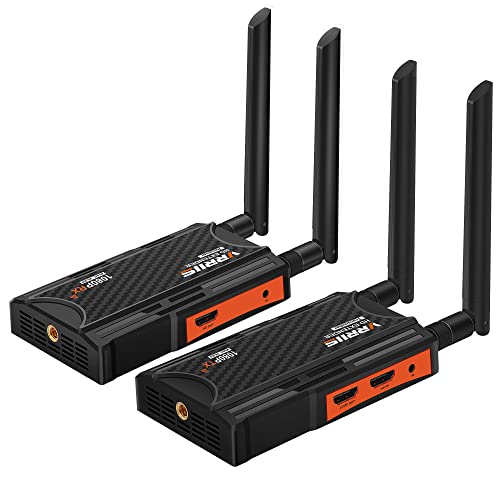
A wireless HDMI system allows you to transmit video and audio signals between devices without using physical cables. It consists of two key components: the transmitter (TX) and the receiver (RX).
- The transmitter connects to the source device (like a computer, gaming console, or smartphone).
- The receiver connects to the output device (such as a TV, monitor, or projector).
These devices work together to create a seamless connection, making it easy to display content without the need for long cables.
Main Components of the System
- Transmitter (TX):
- Connects to the device sending the signal, such as a laptop or gaming console.
- Includes an HDMI port for video/audio input and a USB Type-C port for power.
- Receiver (RX):
- Connects to the display device, like a TV or projector.
- Has an HDMI output and also requires power via USB Type-C.
- Cables and Adapters:
- Usually includes USB Type-C cables for power and HDMI adapters (e.g., Mini HDMI to Full HDMI).
How Does Wireless HDMI Work?
Wireless HDMI systems use 2.4 GHz and 5 GHz frequency bands to transmit data directly between the transmitter and receiver. They don’t rely on an external WiFi network, which ensures a stable, secure connection with minimal latency.
Supported Resolutions
- Input: Up to 4K (3840×2160).
- Output: Full HD 1080p at 60 Hz.
- This means while you can connect a 4K device, the transmitted output will be in 1080p, making it suitable for most everyday uses.
Benefits of Wireless HDMI
Here are some of the top reasons to consider using a wireless HDMI solution:
- Cable-Free Convenience:
- Eliminates the need for long, messy HDMI cables, giving you a cleaner setup.
- Portability:
- Lightweight and compact, these devices are easy to transport and set up anywhere.
- Ease of Use:
- No software installation required; just plug in and play.
- Stable Signal Transmission:
- Works independently of external WiFi networks, ensuring reliable performance.
- Versatile Applications:
- Ideal for home entertainment, gaming, professional presentations, and more.
Step-by-Step Guide to Setting It Up
Setting up a wireless HDMI system is simple and takes only a few minutes.
1. Set Up the Transmitter (TX)
- Connect the transmitter to the HDMI output of your source device (e.g., a laptop, console, or smartphone).
- Power the transmitter using a USB Type-C cable. You can plug it into a USB port on your device or use a power bank for added portability.
2. Set Up the Receiver (RX)
- Plug the receiver into the HDMI input of your display device (e.g., a TV or projector).
- Power the receiver with a USB Type-C cable. You can use the USB port on your TV or a power adapter.
3. Pair the Devices
- Turn on both the transmitter and receiver.
- Most systems pair automatically. If not, press the pairing button on both devices for 5 seconds until the indicator light stabilizes.
4. Test the Connection
- Once paired, test the connection by playing a video or game. The video and audio should stream smoothly on your display device.
Common Applications
Wireless HDMI systems are versatile and can be used in a variety of settings:
1. Home Entertainment
- Stream movies or shows from your laptop to your TV without the need for long cables.
2. Gaming
- Enjoy gaming on a big screen by wirelessly connecting your console to a TV or projector.
3. Professional Presentations
- Seamlessly project content from your laptop to a projector during meetings or conferences.
4. Remote Camera Monitoring
- Connect cameras or other HDMI-enabled devices for wireless video feeds.
Technical Specifications
For those interested in the details, here are the key specs of a typical wireless HDMI system:
| Feature | Specification |
|---|---|
| Maximum Input Resolution | 4K (3840×2160) |
| Output Resolution | Full HD 1080p at 60 Hz |
| Frequency Bands | 2.4 GHz and 5 GHz |
| Range | Up to 30 meters (100 feet) in ideal conditions |
| Latency | Minimal, suitable for gaming |
| Power Requirements | 5V/1A via USB Type-C |
Pros and Cons
While wireless HDMI systems are convenient, they do come with some limitations.
Pros:
- No messy cables.
- Easy to set up.
- Portable and lightweight.
- Stable and secure connection.
Cons:
- Limited output resolution (1080p).
- Shorter range in environments with obstacles like walls.
- Requires USB power, which might not always be available.
When to Use Wireless HDMI vs. Cables
| Feature | Wireless HDMI | HDMI Cables |
|---|---|---|
| Ease of Setup | Plug-and-play, no wires needed. | Requires running long cables. |
| Portability | Highly portable. | Bulky and less flexible. |
| Resolution | 1080p maximum. | Supports up to 4K or higher. |
| Range | Up to 30 meters. | Limited to cable length. |
Recommended Resources
If you’re interested in exploring similar technology solutions, check out these articles:
- How to Install an 8-Channel BTN IP POE Security Camera System
- Android TV Boxes: Everything You Need to Know
- How to Extend Cellular Signal in Offices, Homes, and Closed Spaces
Final Thoughts: Is It Worth It?
A wireless HDMI system is an excellent choice for anyone looking to simplify their setup and eliminate cables. Whether for home entertainment, professional use, or gaming, these devices are affordable, easy to use, and highly portable.
Where to Buy:
You can find these devices online for around $55 USD. Always check the specifications to ensure compatibility with your setup.


AFFILIATED LINKS/ADVERTISING NOTICE All links are Affiliated where possible. When you click on links to various merchants posted here and make a purchase, this can result in me earning a commission from qualifying purchases.”; I am a participant in the Amazon Services LLC Associates Program, an affiliate advertising program designed to provide a means for sites to earn advertising fees by advertising and linking to AMAZON Sites (including, but not limited to Amazon US/UK/DE/ES/FR/NL/IT/CAN) Last update on 2026-02-17