
This post may contain affiliate links. We may receive a small commission, at no cost to you, if you make a purchase.
Read Disclosure
Introduction
In today’s tech-savvy world, spy cameras have become discreet tools for monitoring spaces without attracting attention. One such innovative device is the USB charger spy cam, which doubles as a functional USB hub while capturing high-resolution footage. This review will delve into the features, setup process, and practical uses of the USB charger spy cam.
What is a USB Charger Spy Cam?
A USB charger spy cam is a covert surveillance device embedded in a USB charger. It provides the functionality of a regular USB hub, allowing you to charge multiple devices while secretly recording video. These devices are designed to blend seamlessly into everyday environments, making them ideal for monitoring homes, offices, or even nurseries.
Key Features
1. High-Resolution Video Recording
The USB charger spy cam offers excellent video quality. It supports resolutions up to 1080p, ensuring clear and detailed footage. The camera records in a loop format, meaning once the memory is full, it will overwrite the oldest files with new recordings. This ensures continuous monitoring without the need to frequently clear the storage.
2. Multiple USB Ports
This device comes with five USB ports, each capable of delivering up to 2 amps of power. You can charge various devices, such as smartphones, tablets, or any other gadgets that require a 5V input. The functionality of the USB ports remains unaffected even while the camera is recording.
3. Motion Detection and Night Vision
Equipped with motion detection, the camera can start recording as soon as it detects movement. This feature is useful for saving storage space and battery life. Additionally, the night vision capability allows the camera to record in low-light conditions, making it effective for 24/7 surveillance.
4. Wi-Fi Connectivity
The USB charger spy cam can be connected to Wi-Fi, allowing you to stream live video to your smartphone or computer. This feature lets you monitor your space remotely from anywhere in the world.
5. Easy Setup and Configuration
The initial setup is straightforward. You need to connect the camera to your Wi-Fi network and configure the settings via a mobile app. Once set up, the camera can operate independently, recording to a microSD card or streaming to your preferred device.
How to Set Up Your USB Charger Spy Cam
Setting up the USB charger spy cam is a simple process. Here’s a step-by-step guide:
Step 1: Unbox and Inspect
- Open the box and ensure all components are included: the USB charger spy cam, a power cord, a user manual, and a microSD card (if provided).
Step 2: Insert the MicroSD Card
- Locate the microSD card slot on the device and insert the card. The camera supports up to 128GB, allowing for ample storage of video footage.
Step 3: Plug in the Device
- Connect the USB charger spy cam to a power outlet. Ensure it is placed in a location where it can monitor the desired area effectively.
Step 4: Download the App
- Download the recommended app, usually mentioned in the manual (often the Tuya app). This app will allow you to configure settings and view live footage.
Step 5: Connect to Wi-Fi
- Open the app and follow the instructions to connect the camera to your Wi-Fi network. Ensure the network is a 2.4 GHz band, as many of these cameras do not support 5 GHz networks.
Step 6: Configure Camera Settings
- Through the app, you can adjust various settings such as video resolution, motion detection sensitivity, and notification preferences.
Step 7: Test the Camera
- Check the live feed on your app to ensure the camera is positioned correctly and recording as expected. Adjust the angle if necessary.
Using the Spy Cam Without Wi-Fi
If you prefer not to use Wi-Fi, the camera can still function independently. After the initial setup, you can place the camera anywhere, and it will record directly to the microSD card. However, you won’t be able to receive live notifications or view the feed remotely.
Activating Audio Recording
Some USB charger spy cams come with the audio recording feature disabled by default. To activate it:
- Locate the Activation Sticker: Look for a sticker or card that provides instructions on activating the audio.
- Send an Email: Contact the manufacturer with the firmware number found on the device.
- Receive Firmware Update: You will receive a firmware update via email.
- Install the Update: Load the firmware onto the microSD card, insert it into the camera, and follow the update process as outlined by the manufacturer.
Practical Applications
Home Security
- Monitor entry points, living spaces, or nurseries discreetly.
Office Surveillance
- Keep an eye on your workspace to prevent theft or unauthorized access.
Elderly Care
- Ensure the safety and well-being of elderly family members by monitoring their living areas.
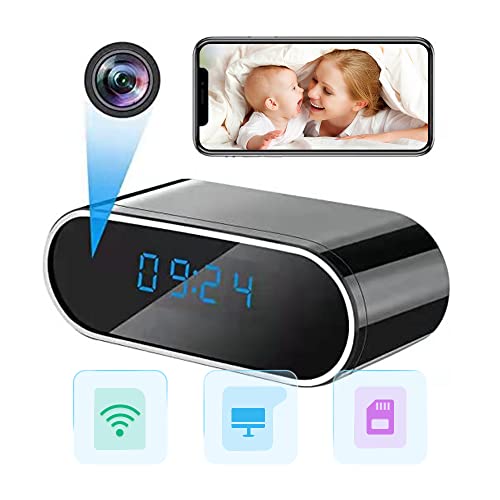
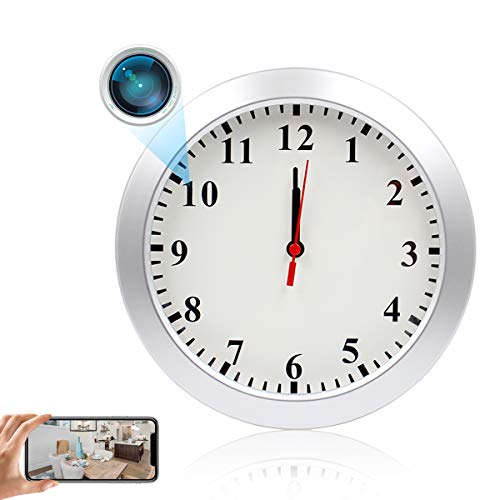
More Spy Cam Options
Interested in exploring more spy camera options? Check out these reviews for a deeper dive:
- Smallest Spy Camera Wireless: Explore ultra-compact cameras that offer stealthy surveillance capabilities.
- Mini Spy Camera HD 1080P Config and Setup: Learn about setting up mini spy cameras for high-definition recording.
- Mini WiFi Security Camera Indoor Wireless with Wide Angle: Discover indoor Wi-Fi cameras with wide-angle views for comprehensive monitoring.
Conclusion
The USB charger spy cam is a versatile tool that combines the convenience of a USB charger with the functionality of a covert surveillance camera. With features like high-resolution video, motion detection, night vision, and Wi-Fi connectivity, it serves as an effective solution for discreet monitoring. Whether you need to secure your home, office, or any other space, this device offers an unobtrusive way to keep an eye on your surroundings.
FAQs
1. How do I access recorded videos on the USB charger spy cam?
- You can view recorded videos via the app or by removing the microSD card and inserting it into a computer.
2. Does the USB charger spy cam support audio recording?
- Yes, but audio recording may need to be activated by following specific instructions from the manufacturer.
3. Can the USB charger spy cam work without Wi-Fi?
- Yes, it can record directly to a microSD card without Wi-Fi after the initial setup.
4. How long does the USB charger spy cam record before overwriting?
- It records in a loop and overwrites the oldest files once the memory is full, typically storing up to 16.5 days of footage with a 128GB card.
5. What apps are compatible with the USB charger spy cam?
- Most devices use apps like Tuya or similar for configuration and live streaming.
Feel free to explore this discreet yet powerful surveillance tool and ensure the safety and security of your spaces effortlessly!


![MITUUT Mini Video Camera [with 64GB 10000 mAh Video Camera] Portable Full HD 1080P Nanny Cam Security Small Body Camera](https://m.media-amazon.com/images/I/41tWmjjftdL.jpg)

AFFILIATED LINKS/ADVERTISING NOTICE All links are Affiliated where possible. When you click on links to various merchants posted here and make a purchase, this can result in me earning a commission from qualifying purchases.”; I am a participant in the Amazon Services LLC Associates Program, an affiliate advertising program designed to provide a means for sites to earn advertising fees by advertising and linking to AMAZON Sites (including, but not limited to Amazon US/UK/DE/ES/FR/NL/IT/CAN) Last update on 2024-10-21